


Errors
Error Indication
When an error occurs on the scanner, the [Error] screen is displayed on the touch screen.
![[Error] Screen](../common/../images/touch_message.png)
Check the solution for the error and press the [OK] button to close the [Error] screen.
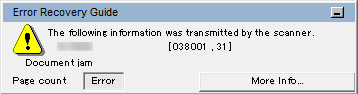
Error Recovery Guide is started up and the icon is displayed in the notification area of the task bar when you logged onto Windows.
When an error occurs on the scanner, the error name and code number is displayed in the Error Recovery Guide window.
Take note of the displayed information and click the [More Info] button to check the troubleshooting procedure.
Error Code List
Error Code |
Error Details |
Refer to |
|---|---|---|
C0:E5 |
Memory error (Front) |
|
C0:E6 |
Memory error (Back) |
|
C0:E9 |
LSI error (Front) |
|
C0:EA |
LSI error (Back) |
|
C1:E0 |
LSI error (Initialization failure) |
|
E2:74 |
Optical error (ADF Front) |
|
E3:75 |
Optical error (ADF Back) |
|
E6:D3 |
Operator Panel error |
|
E7:D2 |
EEPROM error |
|
E9:F5 |
Image memory read-write error (Front) |
|
E9:F6 |
Image memory read-write error (Back) |
|
FA:C5 |
Carrier error |
|
H0:84 |
Motor circuit error |
|
HA:95 |
||
J1:31 |
Paper jam |
|
J1:50 |
Pick error |
|
J2:55 |
Multifeed detected (Overlap) |
|
J2:56 |
Multifeed detected (Length) |
|
L6:1B |
Sensor error |
|
M1:D5 |
Wired LAN error |
|
M4:A2 |
Network setting error |
|
M4:A3 |
||
M4:A4 |
||
M4:A5 |
||
M4:A6 |
||
M4:A7 |
||
M4:A8 |
||
M4:A9 |
||
M4:AA |
||
M4:AB |
||
M4:AD |
||
M4:AC |
Scanner Central Admin setting error |
|
M5:A3 |
||
M5:A4 |
||
M5:A5 |
||
M5:A2 |
Server setting error |
|
M5:AC |
||
M4:B1 |
DirectScan error |
|
M4:B2 |
||
M4:B3 |
||
M4:B4 |
||
M4:B5 |
||
M5:C0 |
||
M5:D1 |
||
M5:D2 |
||
M5:D3 |
||
M5:D4 |
||
M5:D5 |
||
M5:D6 |
||
M6:E1 |
||
M6:E2 |
||
M6:E3 |
||
M6:E4 |
||
M6:A0 |
||
U4:40 |
ADF open |
|
— |
Being used by others |
|
— |
The scanner is in Doc Counting mode. |
|
— |
No Paper |
|
— |
The upper limit has been reached |
|
— |
Scanning has been stopped by the user |
|
— |
Scanning has been paused by the user |
|
U7:20 |
Outside designated scan area error |
|
— |
Invalid Command |