


Parts and Functions
This section shows the names of the scanner parts.
Front
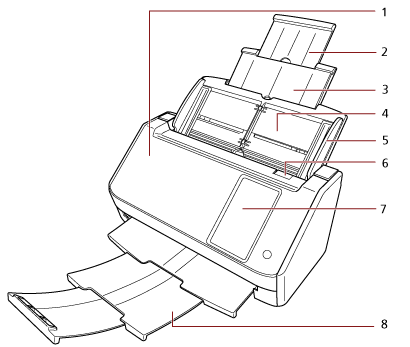
No. |
Name |
Function |
|---|---|---|
1 |
ADF (Automatic Document Feeder) |
Pulls and feeds the documents one sheet at a time from the ADF paper chute (feeder). Open this to replace consumables or to clean the inside of the scanner. |
2 |
Chute extension 2 |
Pull out to adjust to the document length. |
3 |
Chute extension 1 |
Pull out to adjust to the document length. |
4 |
ADF paper chute (feeder) |
Holds the documents to be scanned. |
5 |
Side guide |
Positions the documents in place when the documents are loaded in the ADF paper chute (feeder) as they are fed into the scanner. |
6 |
ADF release tab |
Pull this tab to open the ADF. |
7 |
Touch screen |
Used to operate the scanner or check the status. |
8 |
Stacker |
Pull out to use it. Stacks up the ejected documents when it is pulled out. |
Back
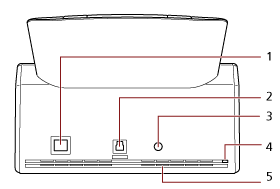
No. |
Name |
Function |
|---|---|---|
1 |
LAN connector |
Used to connect a LAN cable. |
2 |
USB connector |
Used to connect the USB cable. |
3 |
Power connector |
Used to connect a power cable. "Power cable" refers to the AC cable and AC adapter connected together. |
4 |
Security cable slot |
Used to connect an anti-theft security cable (commercially available). |
5 |
Ventilation port |
Holes for ventilating hot air from inside the scanner. |
Removable Parts
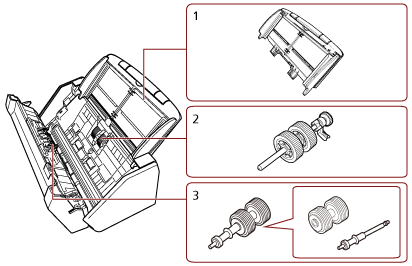
No. |
Name |
Function |
|---|---|---|
1 |
ADF paper chute (feeder) |
Holds the documents to be scanned. |
2 |
Pick roller |
A roller which feeds documents loaded on the ADF paper chute (feeder) into the ADF. |
3 |
Brake roller |
A roller that prevents more than one sheet of documents to be fed into the ADF at once. |
Inside (ADF)
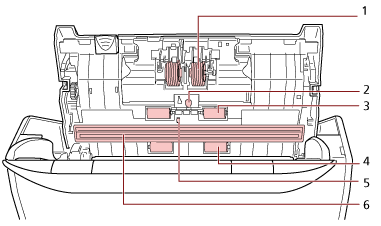

No. |
Name |
Function |
|---|---|---|
1 |
Brake roller (× 2) |
A roller that prevents more than one sheet of documents to be fed into the ADF at once. |
2 |
Ultrasonic sensor (× 2) |
A sensor that detects overlapped documents by ultrasonic soundwave. It detects overlapped documents by monitoring the difference in the amount of ultrasonic waves transmitted through the documents. |
3 |
Rubber idler roller (× 2) |
A roller which feeds documents through the ADF. |
4 |
Plastic idler roller (× 2) |
A roller which feeds documents through the ADF. |
5 |
Document sensor |
A sensor which detects whether there is a document. |
6 |
Glass (× 2) |
The surface which scans documents. |
7 |
Pick roller (× 2) |
A set of rollers which separates one sheet off the documents loaded in the ADF paper chute (feeder), and feeds the document into the ADF. |
8 |
Feed roller (× 2) |
A roller which feeds documents through the ADF. |
9 |
Eject roller (× 2) |
A roller which feeds documents from the ADF onto the stacker. |