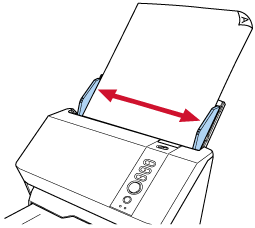
Scanning Documents with a Width between 220 mm and 240 mm
Documents with a width between 220 mm and 240 mm can be scanned only when the side guide adjuster on the ADF paper feed chute (feeder) is operated.
Images exceeding 215.9 mm (8.5 in.) in width cannot be output. The size of the image that can be output depends on the size of the document that can be scanned.
-
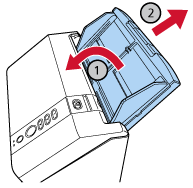
Remove the ADF paper chute (feeder).
Hold both ends of the ADF paper chute (feeder), then lift it in the direction of arrow
 and pull it out in the direction of arrow
  .
.
-
Insert the tip of a ballpoint pen or similar object into the round indentation of the side guide adjuster on the ADF paper chute (feeder) and pull the side guide adjuster toward you.
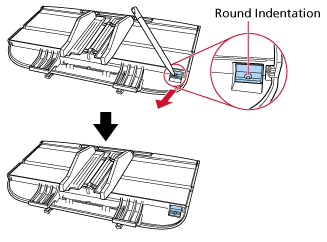
-
Attach the ADF paper chute (feeder).
Insert the tabs into the slots on the back of the scanner in the direction of arrow
and tilt the ADF paper chute (feeder) downwards in the direction of arrow until it locks in place.Attach the ADF paper chute (feeder) with the side guides facing upwards.
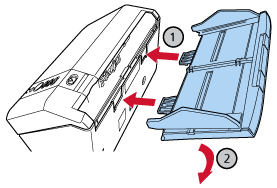 ATTENTION
Do not leave any space between the ADF paper chute (feeder) and the scanner.
-
Adjust the side guides to the width of the documents.
The side guides can be adjusted to fit documents with a width between 220 mm and 240 mm.
Move the side guides so that there is no space between the side guides and the documents.
When there is a space between the side guides and the documents, the documents may be fed skewed.